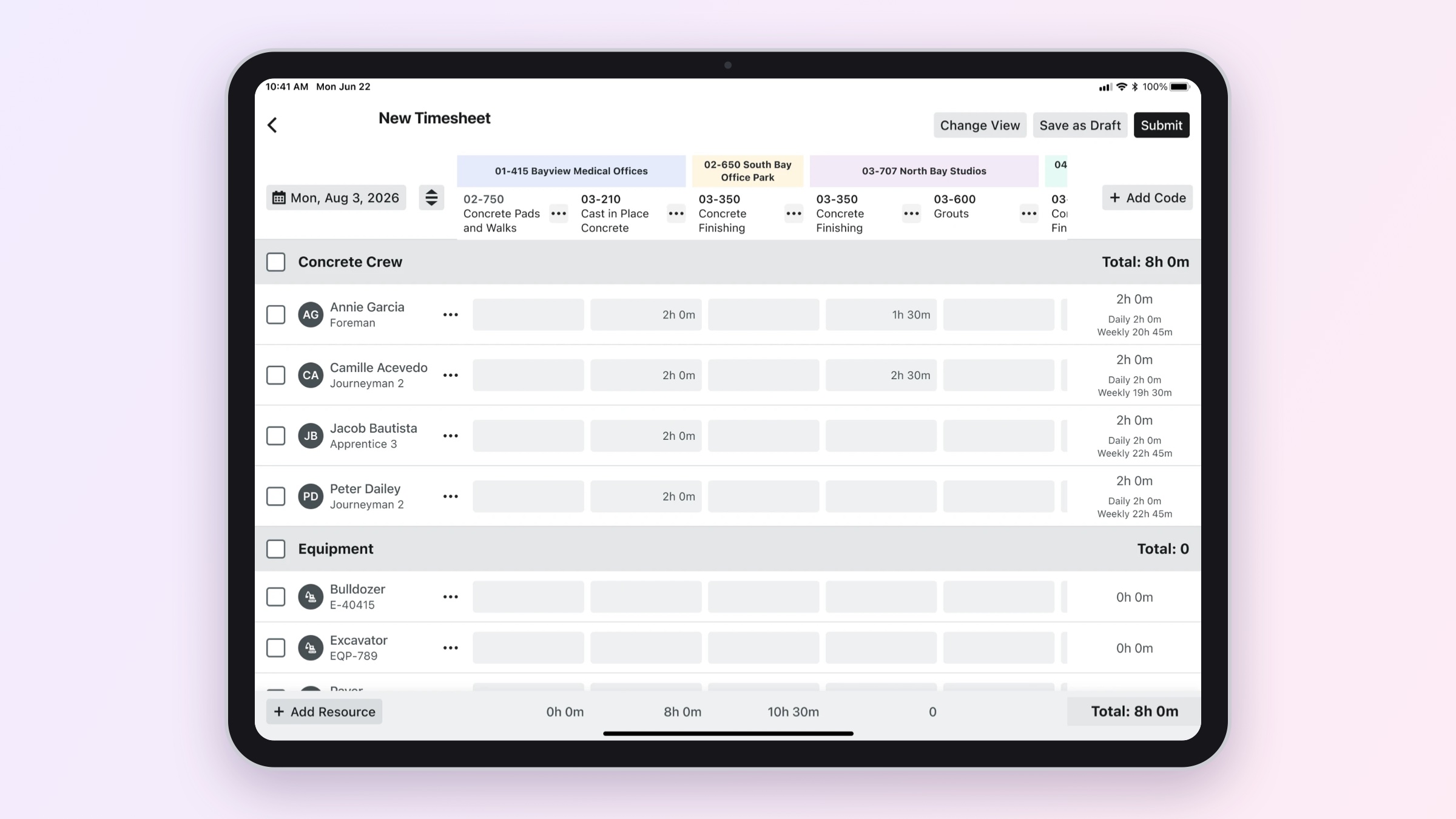
At a glance
- Started discovery and design before the work was prioritized, then built the case for it with the design system and engineering teams.
- Shaped the grid as a reusable table component for the mobile design system, not a one-off screen.
- Shipped to general availability in early 2026 after a closed beta with more than a dozen contractors. Confirm the contractor count you can cite.
- Came back to the features we deliberately left out of the MVP, guided by beta feedback.
Seeing an opportunity before it was a priority
Foremen record crew time on paper sheets and spreadsheet-style tools: one row per person, one column per task. Our mobile timesheet worked line by line instead. Add an entry, pick a person, pick a code, repeat. For a crew of twenty working across several codes, that meant a lot of taps and very little overview.
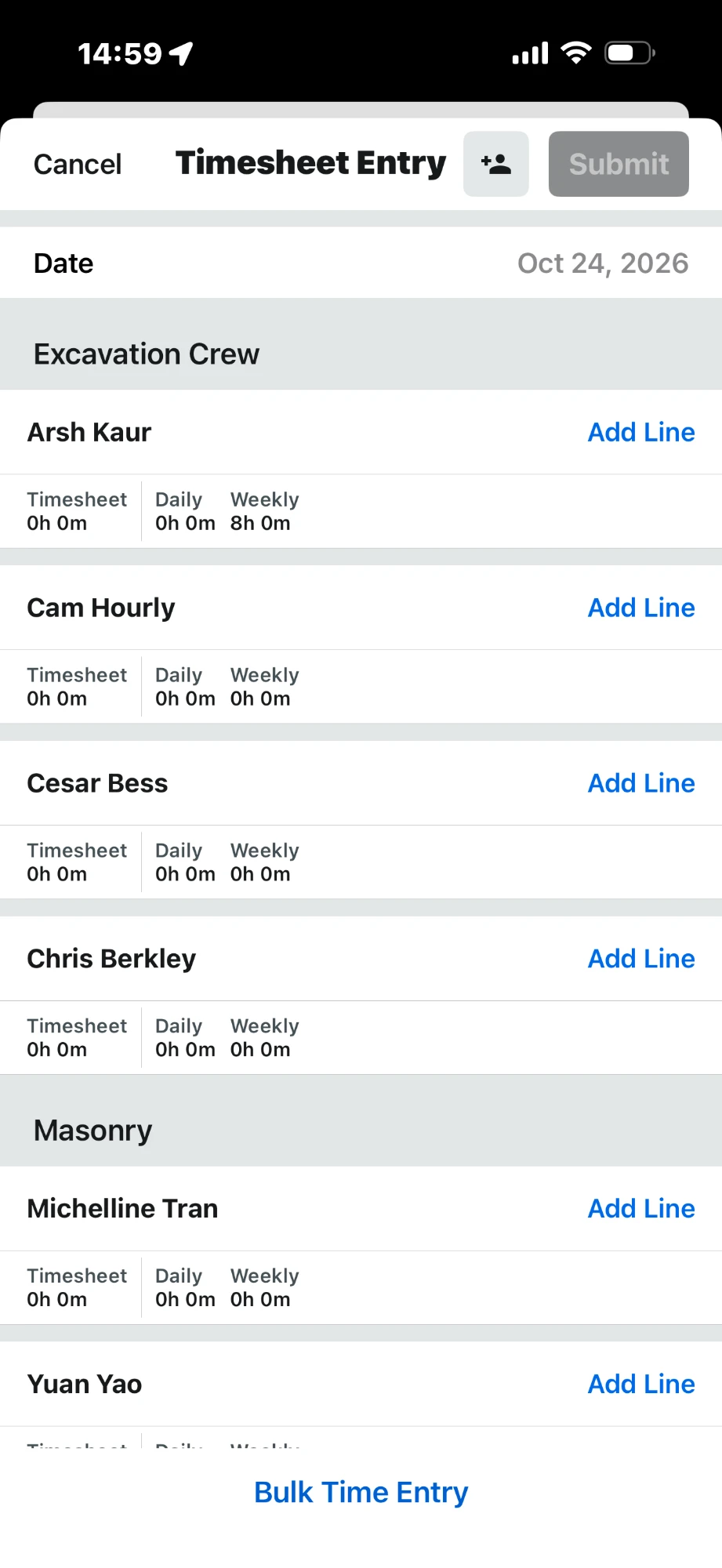
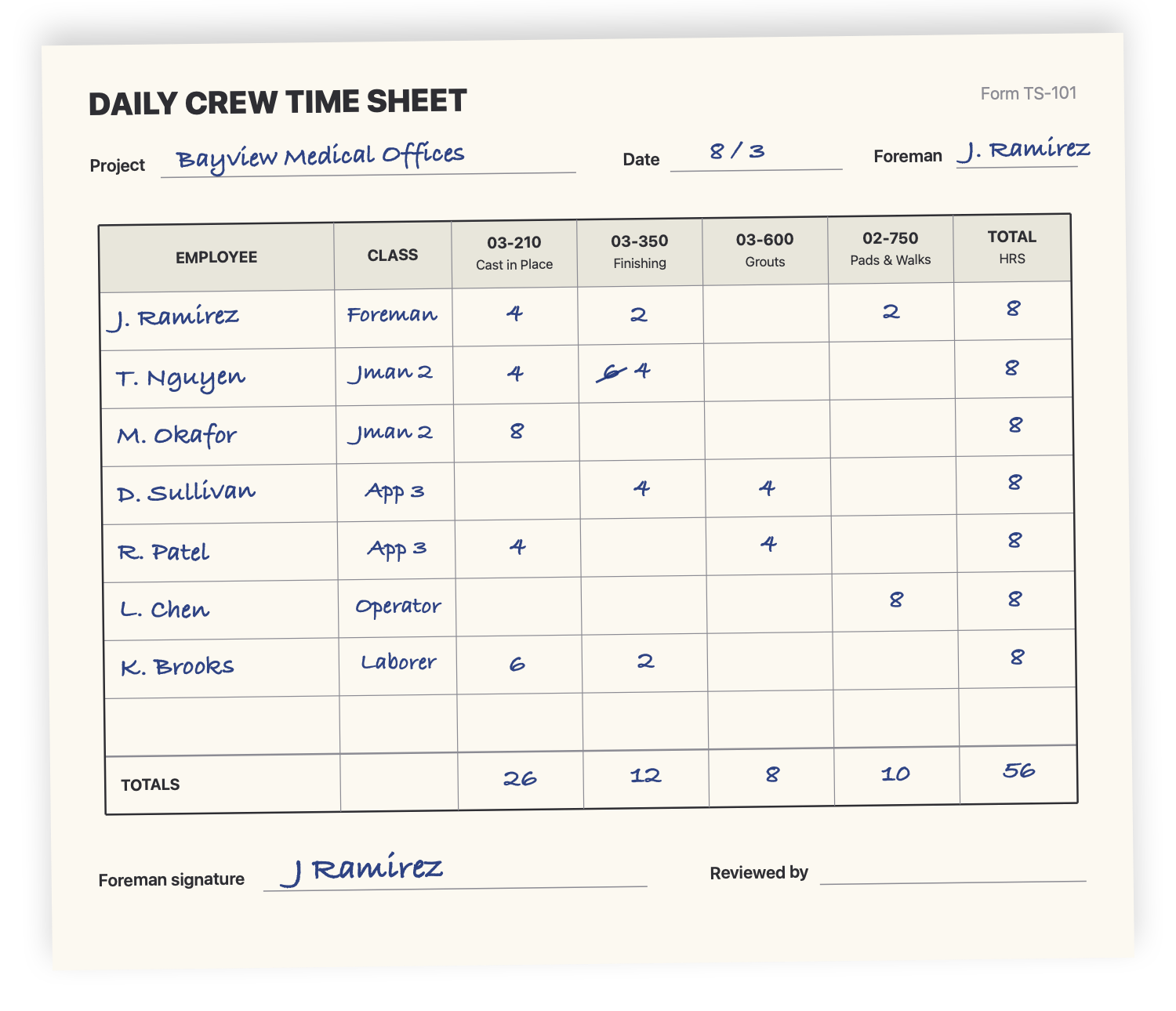
The timesheet we had, next to the kind of paper grid foremen already trusted (illustration).
I started discovery and design on a grid-based experience in February 2024. By April the design was ready, but it was still waiting on a priority. Rather than wait, I built momentum:
- In April 2024, I asked the lead designer of the mobile design system whether the grid could become a shared component instead of a feature-specific build.
- In June, I brought mobile engineers and our engineering manager into a working session to answer the real question underneath: build from scratch for this one tool, or add a new table to the shared library?
- By July, I was working day to day with the developers and helped shape the requirements, which listed the design system and engineering as a dependency for every must-have milestone.
What unlocked prioritization was showing there was a tenable path. By leading the feasibility work with the design system and engineering teams, I turned an open question into a plan product could commit to.
Slow to enter, hard to check
Contractors told us the same things in different words:
- Entering time for a crew is slow, and the screen doesn't show the whole picture.
- Mistakes are common: missing time, double entries, and totals that don't add up.
- The tools foremen trusted before were grid-based, and they expected the same overview in Procore.
Cut the time it takes a foreman to enter and verify a crew's day, while keeping the controls payroll depends on.
Testable, but credible to contractors
I worked with the product manager to scope a first version small enough to get into a real beta quickly, but complete enough that contractors would take it seriously.
In the MVP
- Select crew members, equipment, and task codes to build the grid.
- Enter time as start/stop or total hours, with bulk entry for a whole crew on a task.
- Copy from a previous day, add or remove people and codes after creating, and submit quantities.
- A toggle back to the legacy view, so no one was forced to switch.
Deliberately deferred
We held back a time-type breakdown, quantities inside the grid, and linking equipment to operators, even though we expected customers to ask for them. Getting to a real beta sooner was worth more than a richer first version.
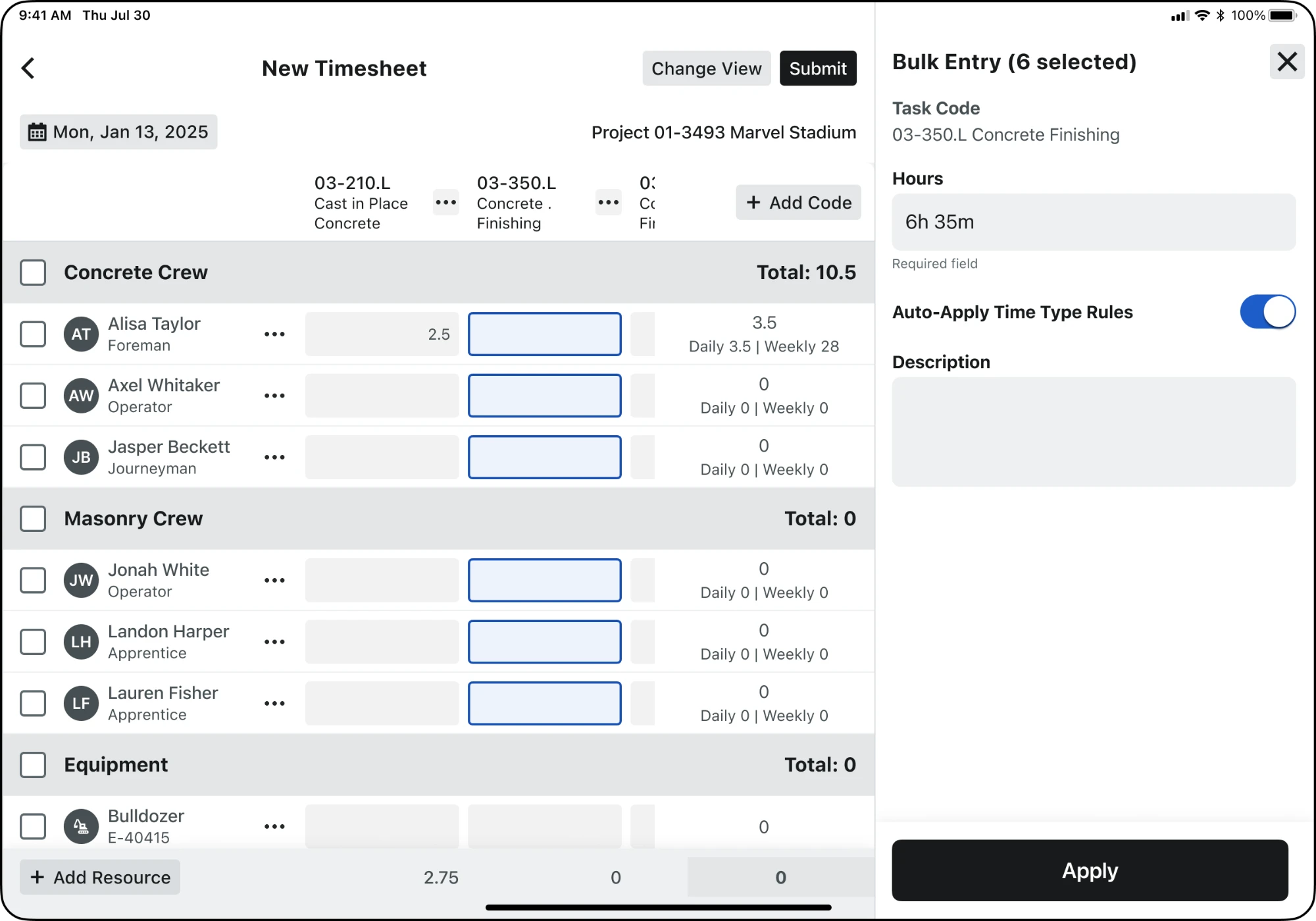
Selecting a whole column to enter hours for an entire crew at once.
Refined in the field
The closed beta started in mid-2025 on iPad, followed by Android tablets. Leading up to general availability, we held feedback sessions with contractors every week or every two weeks, depending on the customer. Since launch, they've continued every two weeks or monthly.
What we heard shaped a series of refinements, including:
- Overlapping time entries: clear messaging when a person's entries overlap, so foremen can catch it before submitting.
- Start and stop times in the grid: showing when work started and stopped right in the cell, not just the total hours.
The grid reached general availability in early 2026.
Admin hours recovered each week for field leadership
Minutes saved per foreman each night
Minutes saved per timesheet
Add the VP's quote and attribution from the customer call these figures came from.
Building a shared table for the design system
This is the part of the project with the longest reach beyond timesheets.
Why a shared component
Early on, there was a real question about building the grid with the existing form builder. Engineering found gaps that mattered for time tracking: conditional visibility, read-only fields that still need to be submitted, checkbox support, and a framework built mainly around another tool. Meanwhile, other mobile experiences, including Production Tracking, were converging on similar tables. A one-off grid would have meant rebuilding the hard parts every time.
The case for a shared table came down to three points:
- It would be a testing ground for a proper tablet experience. The app was optimized for phones, and on tablets it was just a stretched version of the mobile layout.
- A consistent table gives other teams a tested starting point.
- The grid would prove out the component under real field conditions.
What the component had to do
- Fixed edges: the header row and totals footer stay in view while the body scrolls.
- Synchronized horizontal scrolling across the header, every row, and the footer, so columns always line up.
- Selection in both directions: tap a cell, select a column to enter time for a whole crew, or select a row to apply across codes.
- Totals everywhere people look: per row, per column, and per group.
- Built for touch and large crews: fast with many rows and columns, and readable at tablet sizes.
 1
2
3
4
5
6
7
1
2
3
4
5
6
7
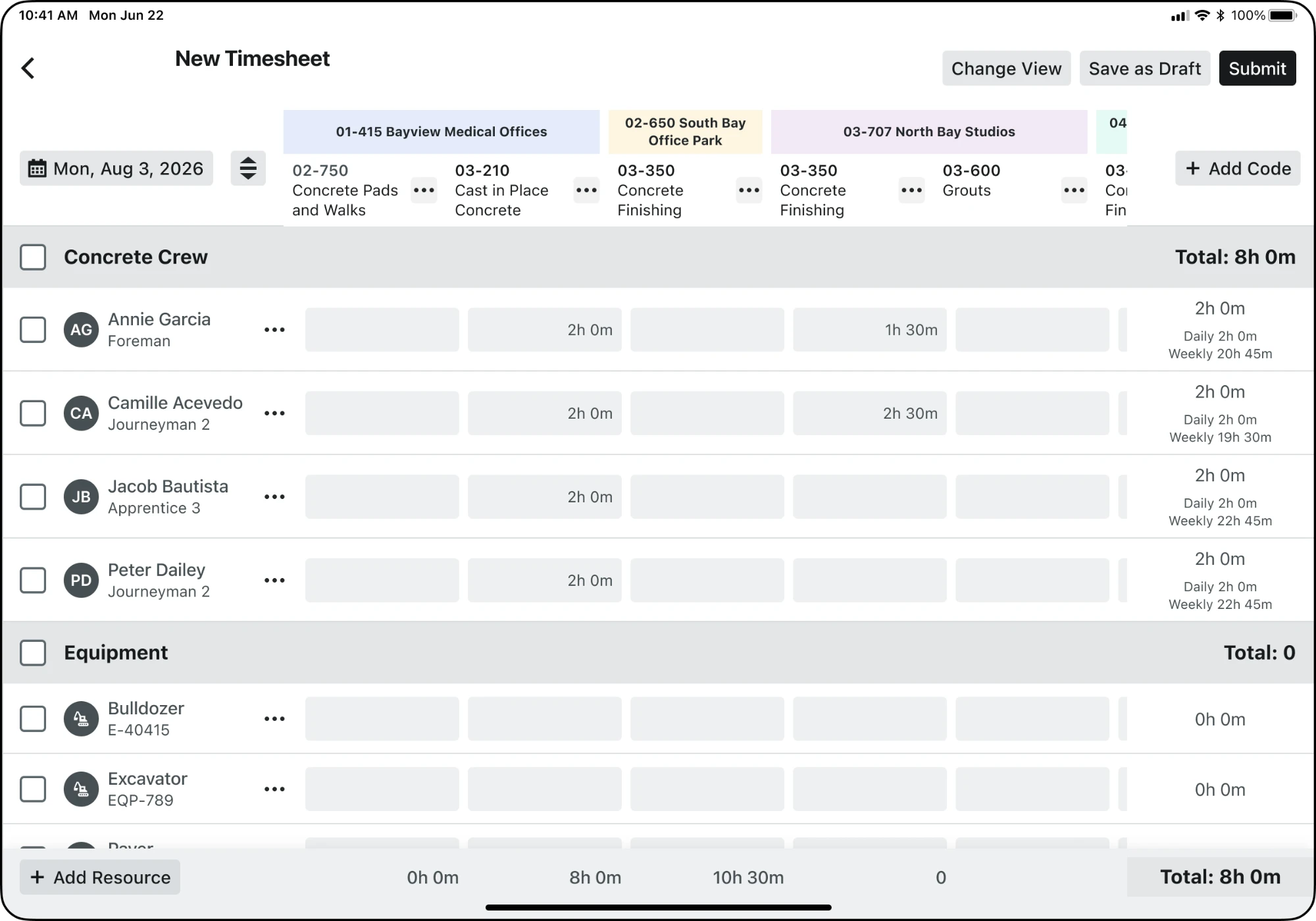
Anatomy of the shared table component.
- 1Two-tier header. Project bands over task codes, fixed while the body scrolls.
- 2Fixed slots for the date picker and Add Code.
- 3Group header with select-all and the group's total.
- 4Resource column. Selection, name, and classification, fixed while columns scroll.
- 5Entry cells that scroll sideways in sync with the header and footer.
- 6Row totals with daily and weekly hours.
- 7Totals footer with each column's total, fixed at the bottom.
Extending it without forking it
When cross-project entry needed task codes grouped under their project, we extended the table instead of building a new one. It gained a two-tier header with project bands, group totals in row-group headers, fixed slots for the date picker and an add-code action, and light and dark tint tokens for each project. The same component still serves the single-project grid.
 2
2
 1
2
1
2
The grid header in the MVP and in the current design.
Comparing the two headers shows the biggest changes:
- 1A two-tier header for cross-project entry. Color-coded project bands sit above the task codes, so a foreman can log a day across several projects in one grid and always see which project a column belongs to.
- 2One column per code. The MVP split each code into separate labor and equipment columns, like 03-350.L and 03-350.E. That repeated the same code and added time to every entry. The current design consolidates them into a single column.
Reach beyond timesheets
The table has already traveled. I've reused it in my Production Tracking work, and designers on the Financials teams have been exploring it for their own projects.
Returning to what we deferred
With the base shipped, I used customer feedback to prioritize the next set of features.
Draft mode
Foremen add time throughout the day, so we started with one local draft per project, on iOS first. Early adoption was limited and people could lose unsaved work, which shaped later iterations.
Labor and equipment linking
Link a person to the equipment they operate, apply the same or different hours, and show equipment IDs instead of descriptions, after several contractors asked for it. People can link during setup, by drag and drop, or in the side panel.
Code consolidation
Show labor and equipment cost types as a single code to save screen space, designed with the product manager.
Cross-project entry
Let a foreman enter a day's work across projects in one grid. The design moved from a mandatory multi-step setup, to a project-first drawer, to three panels for projects, resources, and codes, with valid and invalid cells shown differently.
Time types and weekly summary
Show up to three time types in a cell, labeled "Auto" when applied automatically, plus a weekly view of an employee's time. Three contractors validated it, and one suggested using it to catch absences earlier.
Where it stands
| Area | Status |
|---|---|
| Tablet grid | Generally available |
| Draft mode | Available on iOS In development for Android |
| Labor and equipment linking | Closed beta |
| Code consolidation | In development |
| Cross-project entry | In development |
| Time types on grid | In design review |
What I learned
One customer flagged the "No Code" column early on. Months later it surprised other customers. Small-looking feedback can point to a bigger problem, and I now weigh it more carefully when prioritizing.
Rewrite in your own voice. Also consider: what you'd do differently, a time customer feedback changed your mind, and what it was like persuading a design system team to take on a new component.